
Layout
Layout is the process of sizing and positioning widgets in a scene, according to the layout styles on each widget. Each frame widget performs the layout of its child widgets, recursively, under the control of the overall scene.
Each core.WidgetBase has a core.WidgetBase.Geom field that contains the results of the layout process for each widget.
The layout process involves multiple passes up and down the tree of widgets within the scene, as described below.
Sizing
Determining the proper size of a given widget involves both bottom-up and top-down constraints:
• Bottom-up constraints come from the Min and Max layout styles, and the size needed by text elements to fully display the relevant text, styled according to the style settings.
• Top-down constraints come ultimately from the size of the window containing the scene in which the content is being displayed, and are propagated down from there to all of the frame elements in the scene. Each frame gets an allocation of space from above, and then allocates that space to its children, on down the line.
To satisfy these constraints, multiple passes are required as described below.
The final result of this process is represented in two key variables in the Geom state:
• Actual represents the actual pixel size for a given widget. This is the territory it “owns” and can render into.
• Alloc is the amount allocated to the widget from above.
Critically, the positioning of widget elements within their parent frame is based on their Alloc size. For example, a Grid display type will allocate each element in the grid a regularly-sized rectangle box, even if it doesn’t need the whole space allocated to render (i.e., its Actual may be smaller than its Alloc). To keep these elements positioned regularly, the alloc sizes are used, not the actual sizes.
There are also two different values for each size, according to the box model:
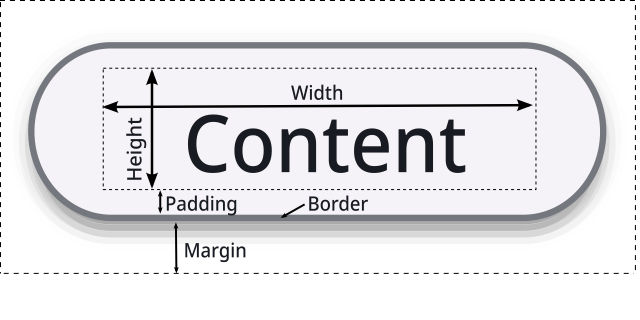
• Content represents the inner contents, which is what the style Min and Max values specify, and has the height and width shown in the above figure.
• Total represents the full size including the padding, border and margin spacing.
The three types of passes are:
SizeUp
This is the bottom-up pass, from terminal leaf widgets up to through their container frames, and sets the Actual sizes based on the styling and text “hard” constraints.
SizeDown
This is the top-down pass, which may require multiple iterations. It starts from the size of the scene, and then allocates that to child elements based on their Actual size needs from the SizeUp pass.
If there is extra space available, it is allocated according to the Grow styling factors. This is what allows widgets to fill up available space instead of only taking their minimal bottom-up needs.
Flexible elements (e.g., Flex Wrap layouts and Text with word wrap) update their Actual size based on the available Alloc size (re-wrap), to fit the allocated shape vs. the initial bottom-up guess.
It is critical that no elements actually Grow to fill the Alloc space at this point: the Actual must remain as a minimal “hard” requirement throughout this process. Alloc is only used for reshaping, not growing.
If any of the elements changed their size at this point, e.g., due to re-wrapping, then another iteration is taken. Re-wrapping can also occur if a scrollbar was added or removed from an internal frame element (if it has an Overflow setting of styles.OverflowAuto for example).
SizeFinal
SizeFinal: is a final bottom-up pass similar to SizeUp, but now with the benefit of allocation-constrained Actual sizes.
For any elements with Grow > 0, the Actual sizes can grow up to their Alloc space. Frame containers
accumulate these new actual values for use in positioning.
Positioning
The Position pass uses the final sizes to set relative positions within their containing widget (RelPos) according to the Align and Justify styles settings.
Critically, if Actual == Alloc, then these settings have no effect! It is only when the actual size is less than the alloc size that there is extra “room” to move an element around within its allocation.
The final ApplyScenePos pass computes scene-based absolute positions and final bounding boxes (BBox) for rendering, based on the relative positions.
This pass also incorporates offsets from scrolling, and is the only layout pass that is required during scrolling, which is good because it is very fast.
Links
• Flutter uses a similar strategy for reference.
• stackoverflow has a discussion of layout issues.